Event Notification Server FAQ
Machine Learning
To use ML-based object detection, first install and configure the Event Server using this document, then set up the ML hooks as described in Machine Learning Hooks. If you already have the ES working, you can skip directly to the ML setup.
For ML-specific troubleshooting, see Machine Learning Hooks FAQ.
What is it?
A WSS (Secure Web Sockets) and/or MQTT based event notification server that broadcasts new events to any authenticated listeners. (As of 0.6, it also includes a non secure websocket option, if that’s how you want to run it)
Why do we need it?
The only way ZoneMinder sends out event notifications via event filters - this is too slow
People developing extensions to work with ZoneMinder for Home Automation needs will benefit from a clean interface
Receivers don’t poll. They keep a web socket open and when there are events, they get a notification
Supports WebSockets, MQTT and Apple/Android push notification transports
Offers an authentication layer
Allows you to integrate custom hooks that can decide if an alarm needs to be sent out or not (an example of how this can be used for person detection is provided)
Is this officially developed by ZM developers?
No. I developed it for zmNinjaNG, but you can use it with your own consumer.
How can I use this with Node-Red or Home Assistant?
As of version 1.1, the event server also supports MQTT (Contributed by
@vajonam). zmeventnotificationNg server can
be configured to broadcast on a topic called
/zoneminder/<monitor-id> which can then be consumed by Home
Assistant or Node-Red.
To enable this, set enable: "yes" under the mqtt section and
specify the server to broadcast to.
You will also need to install the following module for this work
perl -MCPAN -e "install Net::MQTT::Simple"
The MQTT::Simple module is known to work only with Mosquitto as of 10 Jun 2019. It does not work correctly with the RabbitMQ MQTT plugin. The easiest workaround if you have an unsupported MQTT system is to install Mosquitto on the Zoneminder system itself and bridge that to RabbitMQ. You can bind Mosquitto to 127.0.0.1 and disable authentication to keep it simple. The eventserver.pl is then configured to send events to the local Mosquitto. This is an example known working bridge set up (on Ubuntu, for example, this is put into /etc/mosquitto/conf.d/local.conf):
bind_address 127.0.0.1
allow_anonymous true
connection bridge-zm2things
address 10.10.1.20:1883
bridge_protocol_version mqttv311
remote_clientid bridge-zm2things
remote_username zm
remote_password my_mqtt_zm_password
try_private false
topic # out 0
Set the address, remote_username and remote_password for Mosquitto to use on the RabbitMQ. Note that this is a one way bridge, so there is only a topic # out 0. try_private false is needed to avoid a similar error to using MQTT::Simple.
Disabling security
While I don’t recommend either, several users seem to be interested in the following
To run the eventserver on Websockets and not Secure Websockets, use
enable: "no"in thesslsection of the configuration file.To disable ZM Auth checking (be careful, anyone can get all your data INCLUDING passwords for ZoneMinder monitors if you open it up to the Internet) use
enable: "no"in theauthsection of the configuration file.
How do I safely upgrade zmeventnotificationNg to new versions?
STEP 1: get the latest code
Download the latest version & change dir to it:
git clone https://github.com/ZoneMinder/zmeventnotificationNg.git
cd zmeventnotificationNg/
STEP 2: stop the current ES
sudo zmdc.pl stop zmeventnotification.pl
STEP 3: Make a backup of your config files
Before you execute the next step you may want to create a backup of your existing zmeventnotification.yml, objectconfig.yml, and secrets.yml config files. The install script will attempt to upgrade existing configs by merging new keys, and old configs are backed up with numbered suffixes, but it is always good to make your own backup first.
STEP 4: Execute the install script
NOTE : By default install.sh moves the ES script to /usr/bin.
If your ZM install is elsewhere, like /usr/local/bin please modify the TARGET_BIN variable in install.sh before executing it.
sudo -H ./install.sh
Follow prompts. Note that just copying the ES perl file to /usr/bin is not sufficient. You also have to install the updated machine learning hook files if you are using them. That is why install.sh is better. If you are updating, make sure not to overwrite your config files (but please read breaking changes to see if any config files have changed). Note that the install script makes a backup of your old config files using ~n suffixes where n is the backup number. However, never hurts to make your own backup first.
Note that you can also automate updates like so:
sudo -H ./install.sh --install-hook --install-es --no-install-hook-config --no-install-es-config --no-interactive
The above will install/update the hooks, install/update the ES server but will not overwrite your existing config files. NOTE that install.sh now includes an automatic config upgrade step that merges new keys from the example configs into your existing YAML configs. However, you should always read Breaking Changes to check for structural changes
STEP 5: Start the new updated server
sudo zmdc.pl start zmeventnotification.pl
Make sure you look at the logs to make sure its started properly
Configuring the notification server
Understanding zmeventnotificationNg configuration
Starting v1.0, @synthead reworked the configuration as follows:
If you just run
zmeventnotification.plit will try and load/etc/zm/zmeventnotification.yml. If it doesn’t find it, it will use internal defaultsIf you want to override this with another configuration file, use
zmeventnotification.pl --config /path/to/your/config/filename.yml.Its always a good idea to validate you config settings. For example:
sudo /usr/bin/zmeventnotification.pl --check-config


Configuration (read /etc/zm/zmeventnotification.yml):

Secrets file.......................... /etc/zm/secrets.yml
Restart interval (secs)............... 172800

Port ................................. 9000
Address .............................. [::]
Event check interval ................. 5
Monitor reload interval .............. 300

Auth enabled ......................... yes
Auth timeout ......................... 20

Use FCM .............................. yes
FCM API key .......................... (defined)
Token file ........................... /var/lib/zmeventnotification/push/tokens.txt

Use MQTT ..............................no
MQTT Server ...........................127.0.0.1
MQTT Username .........................(undefined)
MQTT Password .........................(undefined)

SSL enabled .......................... yes
SSL cert file ........................ /etc/myserver/fullchain.pem
SSL key file ......................... /etc/myserver/privkey.pem

Verbose .............................. no
Read alarm cause ..................... yes
Tag alarm event id ................... yes
Use custom notification sound ........ no

Hook Script on Event Start ........... '/var/lib/zmeventnotification/bin/zm_event_start.sh'
Hook Script on Event End.............. '/var/lib/zmeventnotification/bin/zm_event_end.sh'

Notify on Event Start (hook success).. all
Notify on Event Start (hook fail)..... web
Notify on Event End (hook success)... fcm,web
Notify on Event End (hook fail)...... web

Notify End only if Start success......yes

Use Hook Description........... yes
Keep frame match type.......... yes
Skipped monitors............... (undefined)
Store Frame in ZM...............yes


Picture URL ................... https://myserver/zm/index.php?view=image&eid=EVENTID&fid=objdetect&width=600
Include picture................ yes
Picture username .............. zmes
Picture password .............. (defined)
What is the hook section ?
The hook section allows you to invoke a custom script when an alarm
is triggered by ZM.
hook_script points to the script that is invoked when an alarm
occurs
If the script returns success (exit value of 0) then the notification server will send out an alarm notification. If not, it will not send a notification to its listeners. This is useful to implement any custom logic you may want to perform that decides whether this event is worth sending a notification for.
Related to hook we also have a hook_description attribute. When
set to 1, the text returned by the hook script will overwrite the alarm
text that is notified.
We also have a hook_skip_monitors attribute. This is a comma separated
list of monitors. When alarms occur in those monitors, hooks will not be
called and the ES will directly send out notifications (if enabled in
ES). This is useful when you don’t want to invoke hooks for certain
monitors as they may be expensive (especially if you are doing object
detection)
Finally, show_frame_match_type (in objectconfig.yml) controls
whether the detection output includes a frame match prefix: [a] for
alarm frame, [s] for snapshot frame, or [x] for other. This is
useful for debugging which frame was used for detection. The default is
yes (prefix included).
Here is an example: (Note: just an example, please don’t ask me for support for person detection)
You will find a sample
zm_event_start.shscript in thehookdirectory. This script is invoked by the notification server when an event starts.This script in turn invokes a python OpenCV based script that grabs an image with maximum score from the current event so far and runs a fast person detection routine.
It returns the value “person detected” if a person is found and none if not
The wrapper script then checks for this value and exits with either 0 (send alarm) or 1 (don’t send alarm)
the notification server then sends out a “: person detected” notification to the clients listening
Those who want to know more: - Read the detailed notes here - Read this for an explanation of how this works
Troubleshooting common situations
The ES randomly hangs
Short answer: Upgrade websocket library to 0.004000. You can do this by:
sudo -H cpan
# and inside the cpan shell
upgrade Net::WebSocket::Server
# exit after that
Explanation:
This is the reason why older versions of the websocket library would hang: If you have exposed the ES port (typically 9000) to the internet, there are chances your ES may lock up. The reason seems to be that that there are internet port scanners which establish a TCP connection that stays connected for a long time and does not upgrade to websockets. This causes the library which I use for the ES to handle websockets to lock up. The original issue can be viewed here.
If you want to disable censys, you can follow their instructions on their website to opt-out In Linux/ubuntu, I use ufw (make sure it is enabled) as a front-end to iptables and the following commands do it:
sudo ufw deny from 74.120.14.0/24 comment "Deny censys"
sudo ufw deny from 162.142.125.0/24 comment "Deny censys"
sudo ufw deny from 167.248.133.0/24 comment "Deny censys"
sudo ufw deny from 192.35.168.0/23 comment "Deny censys"
Note that at least on Ubuntu, ufw keeps getting disabled when I reboot, even after I enable it via systemctl.
To fix that I had to add After=netfilter-persistent.service inside the [Unit] block of /lib/systemd/system/ufw.service
I can’t connect to the ES
There could be multiple reasons:
If you are connecting from WAN make sure you have set up port forwarding as needed
Try changing the
addressattribute innetworksection ofzmeventnotification.yml. If you don’t have your IP specified, it will use[::]. Try0.0.0.0instead.
I just added a new monitor and the ES is not sending notifications for it
This generally happens if you add a monitor _after_ you configure the ES.
Go to zmNinjaNG’s Menu->Settings->Event Server option, enable the monitor you just added, and press save.
The ES is missing events. I see them being triggered in ZM
There could be multiple issues:
Let’s start with the most obvious one. The ES and ZM need to be running on the same server
Alarms are only triggered on Mocord, Modect and Nocord monitors
If you changed monitor modes or added new monitors after the ES started running, restart the ES so it loads the latest information
The ES polls ZM every 5 seconds for new alarms (the duration is controlled by
event_check_intervalinzmeventnotification.yml). This means that if your alarm is very brief, that is, it starts and ends before the ES polls for new events then it will be missed. Note that the ES will catch alarms both inALARMandALERTstate.ALARMis when ZM is actually detecting motion in the event.ALERTis when ZM stops detecting motion but is still waiting around till it writes all yourpost event framesthat you have configured on your ZM Monitor buffer settings. So here is an example: Let’s say I have a “Garage” monitor that I’ve configured a post event buffer of 100 (frames) and I’ve set my camera FPS to 10. That means it will take ZM 10 seconds to close an event after my alarm occurs (it will be inALERTstage all that time). In this case, no matter show short my actual alarm, the ES will always catch it.
LetsEncrypt certificates cannot be found when running as a web user
When the notification server is run in web user mode (example sudo -u www-data), the event notification
server complains that it cannot find the certificate. The error is something like this:
zmeventnotification[10090].ERR [main:547] [Failed starting server: SSL_cert_file /etc/letsencrypt/live/mysite.net-0001/fullchain.pem does not exist at /usr/share/perl5/vendor_perl/IO/Socket/SSL.pm line 402.]
The problem is read permissions, starting at the root level. Typically doing chown -R www-data:www-data /etc/letsencrypt solves this issue
Picture notifications don’t show images
Before you read this, make sure push notifications in general are working (without images). To get images working, the following conditions must be met:
You must use HTTPS
There is a 1MB limit to image size
You can’t use self signed certs
The IP/hostname needs to be accessible by zmNinjaNG on the mobile device you are receiving pushes on
You need a recent version of ZM
A good way to isolate if its a URL problem or something else is replace the
picture_urlin/etc/zm/secrets.ymlwith a knows HTTPS url like this Note that when you use a test image, comment outpicture_portal_usernameandpicture_portal_passwordso they are not auto appended. Remember to restart the ES.Once you have a public URL working as above, look at your ES DEBUG logs (not INF). When a push is beint sent out, you will notice a message like so:
[|----> FORK:Driveway (7), eid:9666 fcmv1: Final JSON using FCMV1 being sent is: {"title":"Driveway Alarm (9666)","image_url":"https://myserver:port/zm/index.php?view=image&eid=9666&fid=objdetect&width=600&username=admin&password=xxx}, <etc>
Take the URL inside
image_urland replace the password with the actual password and paste it in your mobile device. If it works (without requiring to manually login), only then will push images show
Before you report issues, please make sure you have been diligent in testing - Try with a public URL as indicated above. This is important. - In your issue, post debug logs of zmeventnotificationNg so I can see what message it is sending
Secure mode just doesn’t work (WSS) - WS works
Try to put in your event server IP in the address token in
network section of zmeventnotification.yml
I’m not receiving push notifications in zmNinjaNG
This almost always happens when zmNinjaNG is not able to reach the server. Before reporting an issue, please perform the following steps and include the output:
Stop the event server.
sudo zmdc.pl stop zmeventnotification.plDo a
ps -aef | grep zmeventand make sure no stale processes are runningEdit your
/etc/zm/zmeventnotification.ymland make sureconsole_logs: "yes"to get console debug logsRun the server manually by doing
sudo -u www-data /usr/bin/zmeventnotification.pl --debug(replace withwww-datawithapachedepending on your OS)You should now see logs on the commandline like so that shows the server is running:
018-12-20,08:31:32 About to start listening to socket
12/20/2018 08:31:32.606198 zmeventnotification[12460].INF [main:582] [About to start listening to socket]
2018-12-20,08:31:32 Secure WS(WSS) is enabled...
12/20/2018 08:31:32.656834 zmeventnotification[12460].INF [main:582] [Secure WS(WSS) is enabled...]
2018-12-20,08:31:32 Web Socket Event Server listening on port 9000
12/20/2018 08:31:32.696406 zmeventnotification[12460].INF [main:582] [Web Socket Event Server listening on port 9000]
Now start zmNinjaNG. You should see event server logs like this:
2018-12-20,08:32:43 Raw incoming message: {"event":"push","data":{"type":"token","platform":"ios","token":"cVuLzCBsEn4:APA91bHYuO3hVJqTIMsm0IRNQEYAUa<deleted>GYBwNdwRfKyZV0","monlist":"1,2,4,5,6,7,11","intlist":"45,60,0,0,0,45,45","state":"enabled"}}
If you don’t see these logs on the event server, zmNinjaNG is not able to connect to the event server. This may be because of several reasons:
Your event server IP/DNS is not reachable from your phone
If you are using SSL, your certificates are invalid (try disabling SSL first — both on the event server and in zmNinjaNG)
Your zmNinjaNG configuration is wrong (a common error is the server has SSL disabled, but zmNinjaNG is configured to use
wss://instead ofws://)
Assuming the above worked, go to zmNinjaNG logs in the app. Somewhere in the logs, you should see a line similar to:
Dec 20, 2018 05:50:41 AM DEBUG Real-time event: {"type":"","version":"2.4","status":"Success","reason":"","event":"auth"}
This indicates that the event server successfully authenticated the app. If you see step 6 work but not step 7, you might have provided incorrect credentials (and in that case, you’ll see an error message)
Finally, after all of the above succeeds, do a
cat /var/lib/zmeventnotification/push/tokens.txtto make sure the device token that zmNinjaNG sent is stored (desktop apps don’t have a device token). If you are using zmNinjaNG on a mobile device and don’t see an entry intokens.txt, the registration did not succeed.Always include logs from both zmNinjaNG and zmeventnotificationNg when reporting issues. Single-line log excerpts are rarely sufficient — include the full relevant section.
Some other notes:
If you are not using machine learning hooks, make sure you comment out the
hook_scriptline inhook. If you have not setup the scripts correctly, if will fail and not send a push.If you don’t see an entry in
tokens.txt(typically in/var/lib/zmeventnotification/push) then your phone is not registered to get push. Kill zmNinjaNG, start the app, make sure the event server receives the registration and checktokens.txtSometimes, Google’s FCM server goes down, or Apple’s APNS server goes down for a while. Service typically resumes within 24 hours.
Kill the app, empty the contents of
tokens.txt(don’t delete the file), restart the event server, and start the app again. If you don’t see a new registration token, there is a connection problem.I’d strongly recommend you run the event server in “manual mode” and stop daemon mode while debugging.
I’m getting multiple notifications for the same event
Some possibilities:
Most often, its because you have multiple copies of the eventserver running and you don’t know it. Maybe you were manually testing it, and forgot to quit it and terminated the window. Do
sudo zmdc.pl stop zmeventnotification.pland thenps -aef | grep zme, kill everything, and start again. Monitor the logs to see how many times a message is sent out.There are situations where you device token has changed and
/var/lib/zmeventnotification/push/tokens.txthas both the old and new token and both work. In this case, your device will get multiple notifications. Stop the ES, deletetokens.txtand let zmNinjaNG re-register.At times Google’s FCM servers send out duplicate notifications. This is rare and typically resolves itself quickly. Before attributing the issue to FCM, verify that you don’t have multiple ES processes or stale tokens.
How do I reduce the time of delay from an alarm occurring in ZM to the notification being sent out?
First, turn on debug logs. You’ll know where the delays are occurring and then you can deep dive.
Read the principles document: Path 2: From Event Detection to Notification to understand the full notification flow.
There are some key areas you can optimize for:
The ES _polls_ ZoneMinder mapped memory for events. By default it is 5 seconds. To change it, change
event_check_intervalinzmeventnotification.ymlOne an alarm is detected, depending on whether you configured hooks or not, it will invoke object detection. Based on your server/desktop configuration, this can take just a few milliseconds to several seconds. If you are using machine learning hooks, consider using
pyzm.serve(the remote ML detection server) as it preloads models into memory only once. Loading a model can take a few seconds, while detection, if you are on a GPU or TPU takes milliseconds. If you don’t use hooks, turn it off in config.Again, if you are using hooks, there is a
waitattribute inobjectconfig.ymlthat waits for a few seconds before downloading the image from ZM. This was done because sometimes the ES may be asking to download an image that ZM hasn’t written to disk yet (remember, ES is triggered when an alarm starts). This is really no longer needed, if you are using it. You can instead use thestream_sequenceconstruct inobjectconfig.ymlto specify retries.
This is really what comes to mind. If you are seeing unusual delays, please create a github issue and post debug logs (again, NOT info logs please)
Push notifications are delayed by several minutes when the phone turns off (Android)
There seems to be multiple potential reasons:
Starting Android 6, a doze mode and battery optimization mode has been introduced which aggressively tries to put the phone into low power mode. This results in the apps disconnecting from FCM servers for around 10-15 mins at a stretch, which may explain why you get delayed notifications. To avoid this, remove zmNinjaNG from any battery optimization and doze mode effects. There are instructions here on how to do that (scroll to the middle of the page and see the table that describes what to do depending on your phone manufacturer).
The ES delivers messages using
highpriority in Android. However, it looks like google _may_ deprioritize <https://stackoverflow.com/questions/53646761/firebase-push-notification-delay-after-triggering-few-high-priority-notification>__ them if we send too many high priority messages. So try setting yourfcm_android_prioritytonormalif you see this issue. However, if you set it to normal, messages may be delayed if you are in doze mode.Finally, experiment with setting
fcm_android_ttlto0along withfcm_android_prioritytohighIf nothing else works, set use_fcmv1 to no in zmeventnotification.yml to go back to legacy protocol
There may be undocumented combinations of FCMv1 attributes that improve delivery behavior. If you find a working configuration, please share it via a GitHub issue.
If you are wondering what this all means for iOS - it is unaffected. iOS uses a priority 10 by default (high) that delivers the notification instantly.
The server runs fine when manually executed, but fails when run in daemon mode (started by zmdc.pl)
(This only covers daemon mode of the ES server. If you are facing issues related to hooks running in daemon model, please see Machine Learning Hooks FAQ)
Make sure the file where you store tokens (
/var/lib/zmeventnotification/push/tokens.txt or whatever you have used) is not RW Root only. It needs to be RWwww-datafor Ubuntu/Debian orapachefor Fedora/CentOS. You also need to make sure the directory is accessible. Something likechown -R www-data:www-data /var/lib/zmeventnotification/pushMake sure your certificates are readable by
www-datafor Ubuntu/Debian, orapachefor Fedora/CentOS (thanks to @jagee).Make sure the path to the certificates are readable by
www-datafor Ubuntu/Debian, orapachefor Fedora/CentOS
When you run zmeventnotifiation.pl manually, you get an error saying ‘port already in use’ or ‘cannot bind to port’ or something like that
The chances are very high that you have another copy of
zmeventnotification.pl running. You might have run it in daemon
mode. Try sudo zmdc.pl stop zmeventnotification.pl. Also do
ps -aef | grep zmeventnotification to check if another copy is not
running and if you do find one running, you’ll have to kill it before
you can start it from command line again.
Running hooks manually detects the objects I want but fails to detect via ES (daemon mode)
There may be multiple reasons, but a common one is of timing. When the ES invokes the hook, it is invoked almost immediately upon event detection. In some cases, ZoneMinder still has not had time to create an alarmed frame, or the right snapshot frame. So what happens is that when the ES invokes the hook, it runs detection on a different image from the one you run later when invoked manually. Try adding a wait = 5 to objectconfig.yml to that monitor section and see if it helps
I just upgraded ZoneMinder and I’m not getting push notifications
Make sure your eventserver is running:
sudo zmdc.pl status zmeventnotification.pl
How do I disable secure (WSS) mode?
As it turns out many folks run ZM inside the LAN only and don’t want to
deal with certificates. Fair enough. For that situation, edit
zmeventnotification.pl and use enable: "no" in the ssl section
of the configuration file. Make sure your EventServer
URL in zmNinjaNG also uses ``ws://`` instead of ``wss://``. Restart
the ES after this change.
Logging
Setting up logging in both ES and detection (if you use them) is critical to be able to diagnose issues. Here is what I do:
This gives you a summary of what you need to do:
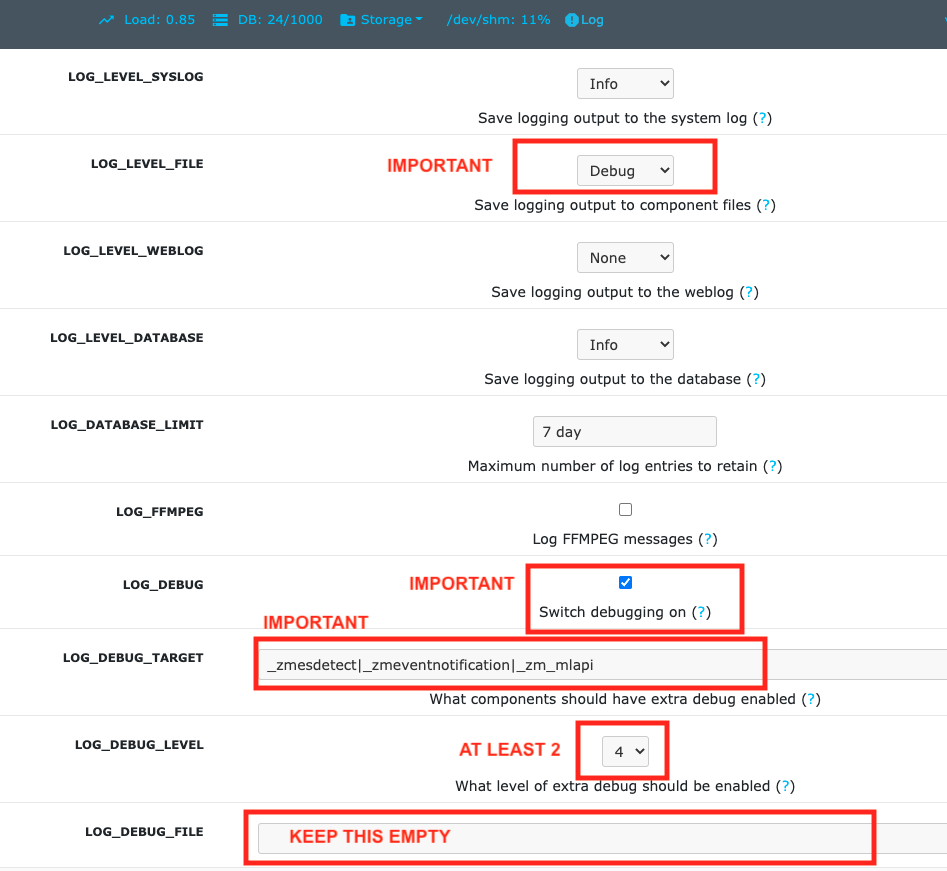
In
ZM->Options->Logs:LOG_DEBUG is on
LOG_LEVEL_FILE = debug
LOG_LEVEL_SYSLOG = Info
LOG_LEVEL_DATABASE = Info
LOG_DEBUG_TARGET =
_zmesdetect|_zmeventnotification. This enables DEBUG logs for both detection and event server scripts. Iff you have other targets, just separate them with|- example,_zmc|_zmesdetect. If you only want to track detection logs and not ES logs, just do_zmesdetect. You can also enable debug logs for just one monitor’s hooks like so:_zmesdetect_m5|_zmeventnotification. This will enable debug logs only when hooks are run for monitor 5. Just remember this: “detection logs” only deal with detecting objects. The ES logs will tell you whether the detection text was received properly, whether it was written to ZM DB properly and whether it was sent out in a notification.
The above config. will store debug logs in my
/var/log/zmdirectory, while Info level logs will be recorded in syslog and DB.You will likely need to restart ZM after this.
So now, to view hooks/detect logs, all I do is:
tail -F /var/log/zm/zmesdetect*.log
To view ES + hooks/detect logs:
tail -F /var/log/zm/zmesdetect*.log /var/log/zm/zmeventnotification.log
Note that the detection code registers itself as
zmesdetectwith ZM. When it is invoked with a specific monitor ID (usually the case), then the component is namedzmesdetect_mX.logwhereXis the monitor ID. In other words, that now gives you one log per monitor (just like/var/log/zm/zmc_mX.log) which makes it easy to debug/isolate. Also note we are doingtail -Fnottail -f.-Ftracks files as they get logrotated as well.
Debugging and reporting problems
Before reporting an issue, please make sure you have read the common problems section and have followed every step of the install guide in sequence.
Please always include relevant logs when reporting issues. Read Logging for how to enable and collect them.
Here is how to debug and report:
If your problem involves zmNinjaNG:
Enable Debug logs in zmNinjaNG (Setting->Developer Options->Enable Debug Log)
Clear the logs, replicate the issue, and collect the logs immediately after. This makes it much easier to identify the relevant entries.
If your problem involves the ES and/or the hooks:
Enable ZM debug logs for both ES (and hooks if you use them) as described in Logging. Note that ES debug logs are different from hooks debug logs. You need to enable both if you use them.
When you send ES/detection logs:
When zm_detect.py starts, it logs both its own version and the pyzmNg library version. Make sure both are current. If the versions are mismatched, re-run install.sh to bring everything up to date.
Make sure you see
DBGlogs (Debug). If you only seeINFlogs, you haven’t followed the instructions above to enable debug logs. Read Logging again.Please include the full logs, not just a snippet. Specifically:
For detection issues with a specific event (e.g. eid=77985): include all ES logs from
PARENT: New event 77985 reported for Monitor:<etc>throughPARENT: Job: Deleting active_event eid:77985, mid:<etc>. Also include the corresponding detection logs (e.g./var/log/zm/zmesdetect_m2.logfor Monitor ID 2) for that event.For ES startup issues: include all logs from when the ES starts after
sudo zmdc.pl restart zmeventnotification.pl.
To get DEBUG logs:
Option 1 (Easy):
Stop ES if it is running as a daemon (
sudo zmdc.pl stop zmeventnotification.pl)Start a terminal and start zmeventnotification manually from command line like so
sudo -u www-data /usr/bin/zmeventnotification.pl --debugThis will print debug logs on the terminal
Note that this will NOT print debug logs for hooks, so if you feel the problem is with hooks, see this section
Option 2 (More comprehensive): Enable ZM logs
Follow steps here
It is _very_ important to make sure you follow _all_ the steps or you won’t see logs
When you set up debug logging via ZM, you will see debug logs from both ES and hooks in different files like so:
pp@homeserver:~/fiddle/zmeventnotificationNg$ tail -F /var/log/zm/zmeventnotification.log /var/log/zm/zmesdetect_m*.log
==> /var/log/zm/zmeventnotification.log <==
10/06/2019 06:48:29.200008 zmeventnotification[13694].INF [main:557] [Invoking hook:'/var/lib/zmeventnotification/bin/zm_event_start.sh' 33989 2 "DoorBell" " front" "/var/cache/zoneminder/events/2/2019-10-06/33989"]
10/06/2019 06:48:34.013490 zmeventnotification[29913].INF [main:557] [New event 33990 reported for Monitor:10 (Name:FrontLawn)  front steps]
10/06/2019 06:48:34.020958 zmeventnotification[13728].INF [main:557] [Forking process:13728 to handle 1 alarms]
10/06/2019 06:48:34.021347 zmeventnotification[13728].INF [main:557] [processAlarms: EID:33990 Monitor:FrontLawn (id):10 cause: front steps]
10/06/2019 06:48:34.237147 zmeventnotification[13728].INF [main:557] [Adding event path:/var/cache/zoneminder/events/10/2019-10-06/33990 to hook for image storage]
10/06/2019 06:48:34.237418 zmeventnotification[13728].INF [main:557] [Invoking hook:'/var/lib/zmeventnotification/bin/zm_event_start.sh' 33990 10 "FrontLawn" " front steps" "/var/cache/zoneminder/events/10/2019-10-06/33990"]
10/06/2019 06:48:46.529693 zmeventnotification[13728].INF [main:557] [For Monitor:10 event:33990, hook script returned with text: exit:1]
10/06/2019 06:48:46.529896 zmeventnotification[13728].INF [main:557] [Ending process:13728 to handle alarms]
10/06/2019 06:48:47.640414 zmeventnotification[13694].INF [main:557] [For Monitor:2 event:33989, hook script returned with text: exit:1]
10/06/2019 06:48:47.640668 zmeventnotification[13694].INF [main:557] [Ending process:13694 to handle alarms]

==> /var/log/zm/zmesdetect_m10.log <==
10/06/19 06:48:42 zmesdetect_m10[13732] DBG zm_detect.py:344 [No match found in /var/lib/zmeventnotification/images/33990-alarm.jpg using model:yolo]
10/06/19 06:48:42 zmesdetect_m10[13732] DBG zm_detect.py:189 [Using model: yolo with /var/lib/zmeventnotification/images/33990-snapshot.jpg]
10/06/19 06:48:46 zmesdetect_m10[13732] DBG zm_detect.py:194 [|--> model:yolo detection took: 3.541227s]
If you are debugging problems with receiving push notifications on zmNinjaNG mobile, replicate the following scenario:
Run the event server in manual mode as described above
Kill zmNinjaNG
Start zmNinjaNG
At this point, you should see registration messages in the
zmeventnotificationlogs (refer to logs example above). If you don’t, either zmNinjaNG is not configured to use the event server, or it can’t reach it.Make sure zmNinjaNG is not running in the foreground (move it to background or kill it). When in the foreground, it receives notifications via websockets instead of push.
Force an alarm like I described above. If you don’t see logs in
zmeventnotificationsaying “Sending notification over FCM” then the eventserver, for some reason, does not have your app token. Inspecttokens.txt(typically in/etc/zm/) to make sure an entry for your phone existsIf you see that message, but your mobile phone is not receiving a push notification:
Make sure you haven’t disabled push notifications on your phone
Make sure you haven’t muted notifications
Sometimes Apple’s or Google’s push servers delay or drop messages temporarily — wait 24 hours and retry
Open zmNinjaNG, go to logs, and include them when reporting an issue
When reporting issues, include both your zmeventnotificationNg logs and zmNinjaNG debug logs
Brickbats
Why not just supply the username and password in the URL as a resource? It’s over TLS
Yes, the data is encrypted, but it may show up in the history of a browser you tried it from (if you are using a browser) Plus it may get passed along from the source when accessing another URL via the Referral header
So it’s encrypted, but passing password is a bad idea. Why not some token?
ZM supports login tokens and pyzmNg uses them automatically.
Why WSS and not WS?
Not secure. Easy to snoop. Updated: As of 0.6, I’ve also added a non
secure version - use enable: "no" in the ssl section of the
configuration file. As it turns out many folks don’t expose ZM to the
WAN and for that, I guess WS instead of WSS is ok.
Why ZM auth in addition to WSS?
WSS offers encryption. We also want to make sure connections are
authorized. Reusing ZM authentication credentials is the easiest. You
can change it to some other credential match (modify validateZM
function)